

Jazz guitar chords can be complicated and as a beginner, it’s hard to know where to start. When first learning how to play jazz chords, many of us are intimidated by their sounds and shapes. But, jazz chords don’t have to be difficult to get under your fingers if you begin with the right shapes. The chord chart in this lesson features the 17 chord shapes that are essential when learning how to play jazz guitar.
This lesson is designed to introduce you to the various families of jazz guitar chords, with a focus on important, but easy-to-play shapes.
By studying the basic jazz chords in this lesson, you will not only introduce yourself to the world of jazz guitar chords, but you will learn how to apply them to chord progressions as well, getting you ready to jam with friends or comp along to your favorite backing track in no time.
Table of Contents
What Are Jazz Chords?
This is a tough question to ask, as many chords associated with jazz are also found in pop, classical, rock, blues, and other musical genres.
Jazz chords are shapes that use at least 4 notes in their construction. These are chords that go beyond the 3-note triad and include the 7th, 9th, 11th, and/or 13th.
If you want to play a major chord in rock, you would normally just play the major triad, G for example.
If you want to play a major chord in jazz, you would play Gmaj7, G6, G6/9, or another major chord that extends beyond the major triads that are used as rock guitar chords.
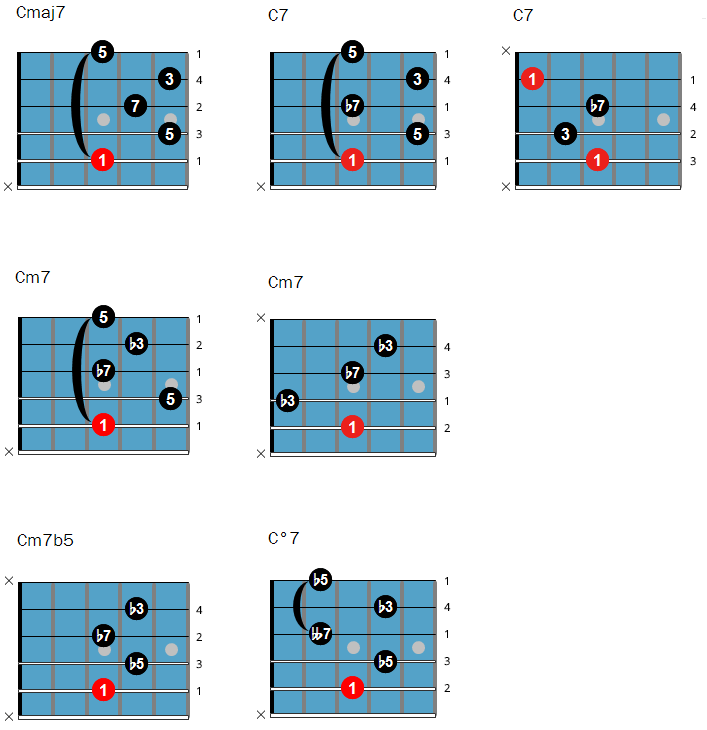
In order to help you learn the construction of each chord in this lesson, the intervals for each shape have been written on the fretboard, which will help you understand how all of these chords have been constructed.
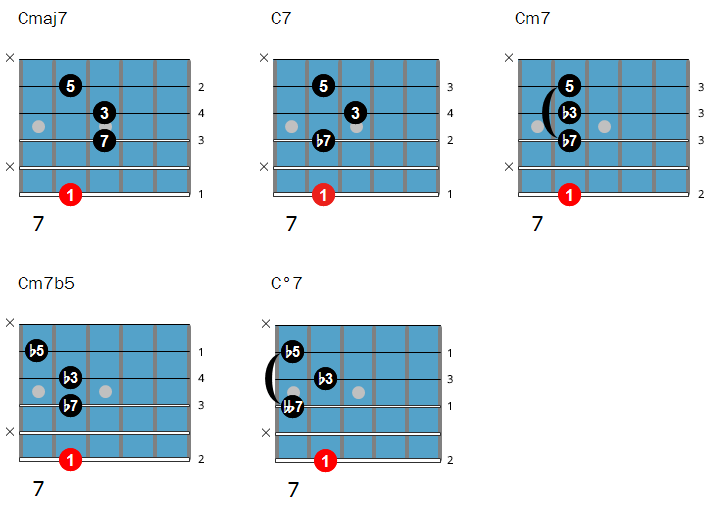
Here are the interval formulas for the five chord types you will be learning first:
- Major 7th chords: 1 3 5 7
- Dominant 7th chords: 1 3 5 b7
- Minor 7th chords: 1 b3 5 b7
- Half-Diminished 7th chords: 1 b3 b5 b7
- Diminished 7th chords: 1 b3 b5 bb7
These formulas are explained in more detail in our chord theory tutorial, but knowing them isn’t a must at this time. You can learn jazz without knowing too much theory, although music theory can be a huge time-saver for learning jazz guitar.
Start by learning the basic chords and chord progressions below, and then keep working on chord theory, as it will be covered in other guitar lessons.
How to Read Chord Diagrams?
The red circle represents the root note (aka 1 or bass note) of the chord. The numbers in the black circles are the other chord tones.
On the chord charts below, all bass notes are C.
By moving these chord shapes up or down the guitar neck, you get other chords of the same type.
For example: move the chord shape of Cmaj7 two frets higher and it becomes a Dmaj7.
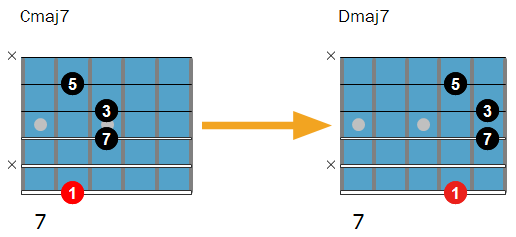
The number underneath the chord diagram is the fret number.
In the example above, the starting fret is the 7th fret. This means you put your finger on the 8th fret on the lowest string, a finger on the 9th fret of the D-string, a finger on the 9th fret of the G-string, and finally a finger on the 8th fret of the B-string.
The numbers at the right side of each chord diagram indicate which fingers to use to fret the chord with your left hand.
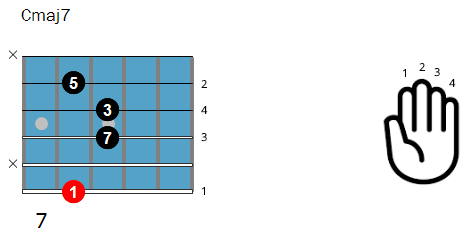
The x symbols at the left side of the chord indicate that those strings are not to be played. This means most of the chords in these chord charts cannot be strummed but must be played fingerstyle, with the thumb and first three fingers of your right hand.
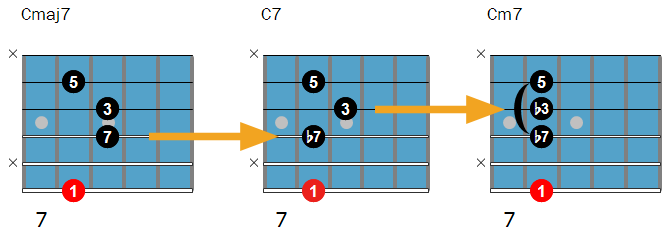
Notice how each chord type only changes one note compared to the next chord type. This can help you memorize the chords and relate them to one another.
For example: Cmaj7 (first shape) and C7 (second shape) only have one different note (the flat 7). The same goes for C7 and Cm7 (the minor 3rd).
Hear how changing these notes alters the chord quality.
Jazz Guitar Chord Charts
The following chord charts show you the easy jazz chords laid out on the fretboard for you to play through and use as a reference guide for further study.
These must-know chord voicings are essential for any beginning jazz guitarist and the minimum requirement to learn jazz standards. If you memorize every chord shape and practice them well, you will be able to play the chord changes of most jazz standards.
Learning jazz chords is best done by playing songs and practicing the chord progression exercises that are below the jazz chord chart. When you have these exercises under your fingers, start playing other chord progressions.
Jazz Chords with the Root Note on the 6th String
Jazz Chords with the Root Note on the 5th String
Jazz Chords with the Root Note on the 4th String
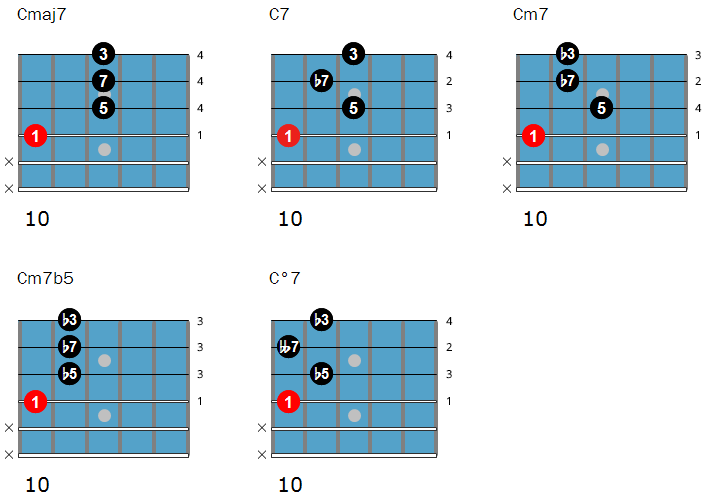
Click here to download these chord charts as an infographic.
How To Practice Jazz Guitar Chords?
The most fun and effective way to practice jazz guitar chords is playing chord progressions and jazz standards.
Below are four exercises that will get these beginner guitar chords under your fingers.
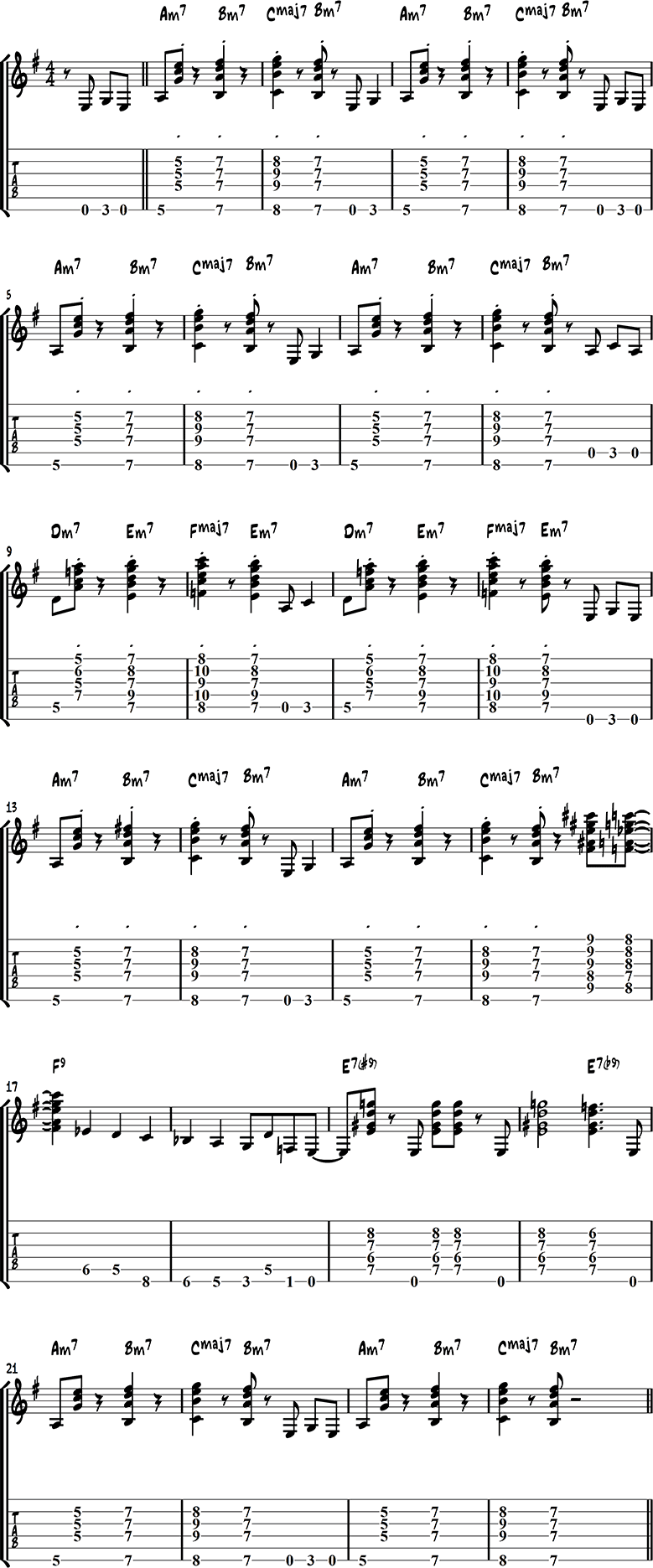
Jazz Guitar Chords Exercise 1 – Kenny Burrell
This vamp in the style of Kenny Burrell is a good exercise to practice minor and major 7 chords.
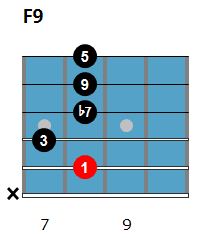
In this exercise, you will learn three common chords, beginning with F9 (bar 17):
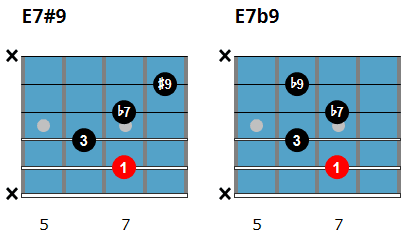
The next two are E7#9 and E7b9, which are often played in succession (bar 19 and 20):

Drum Backing Track
Listen & Play-Along
Jazz Guitar Chords Exercise 2 – Diminished Chords
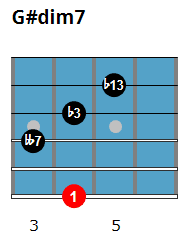
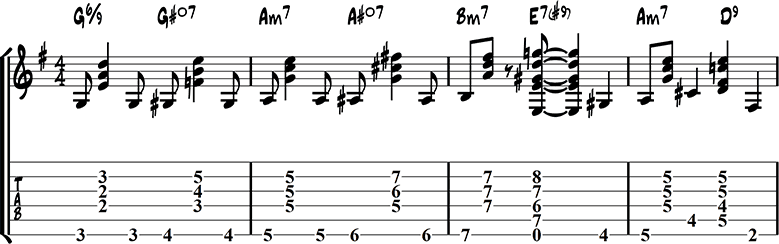
This chord progression exercise introduces a new, but common diminished chord shape (here with G# as the root):

Jazz Guitar Chords Exercise 3
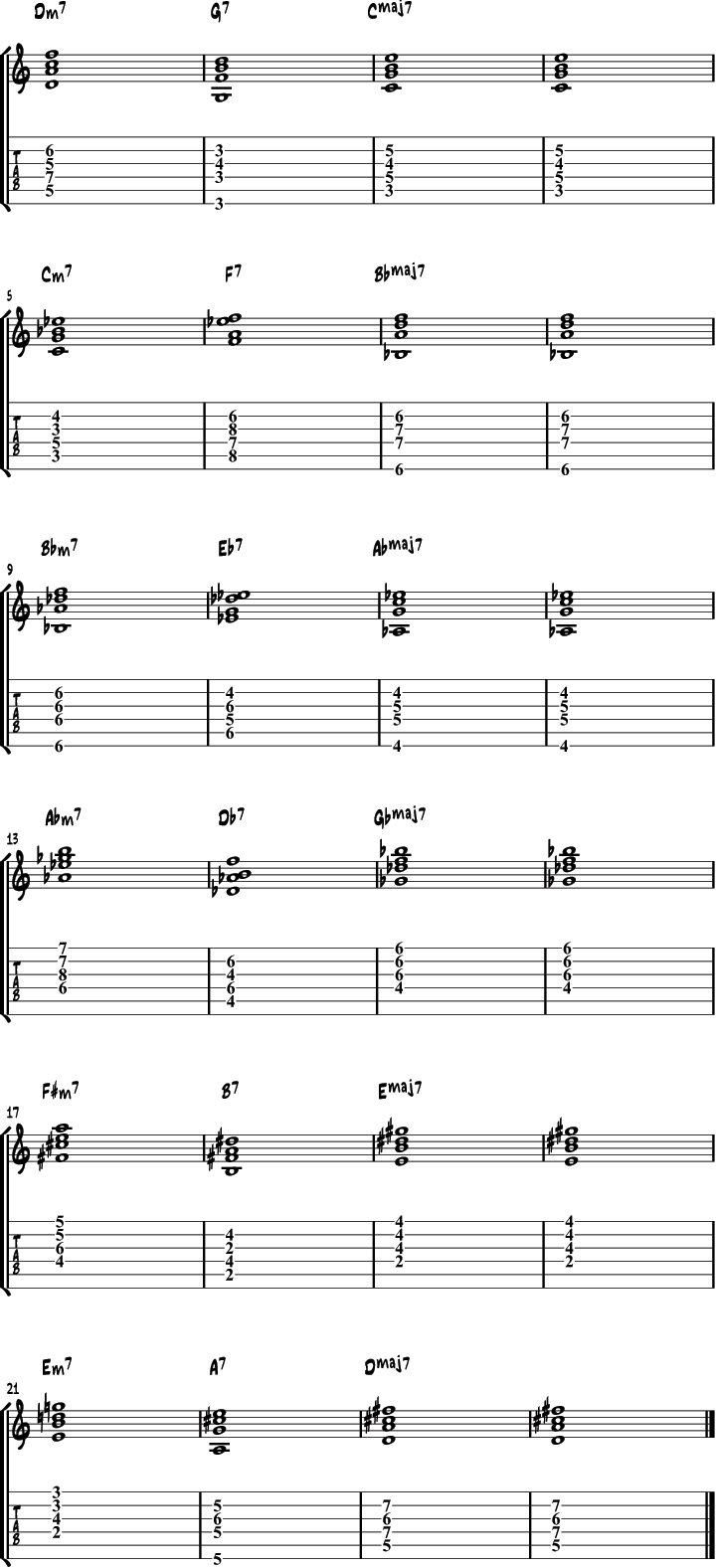
in this exercise, you will be playing a series of 2 5 1 progressions using a simple rhythm so you can concentrate on the chords.
Backing Track
Listen & Play Along
Jazz Guitar Chord Exercise 4 – Walking Bass
This exercise combines the beginner guitar chords from above with a walking bass line.
Rhythm Track
Listen & Play Along
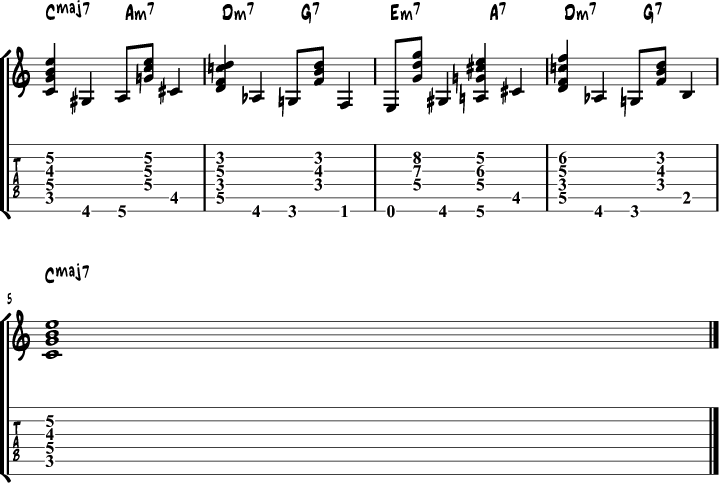
Jazz Guitar Chord Exercise 5
This chord exercise over a common chord progression includes diminished chords.
Backing Track
Listen & Play Along
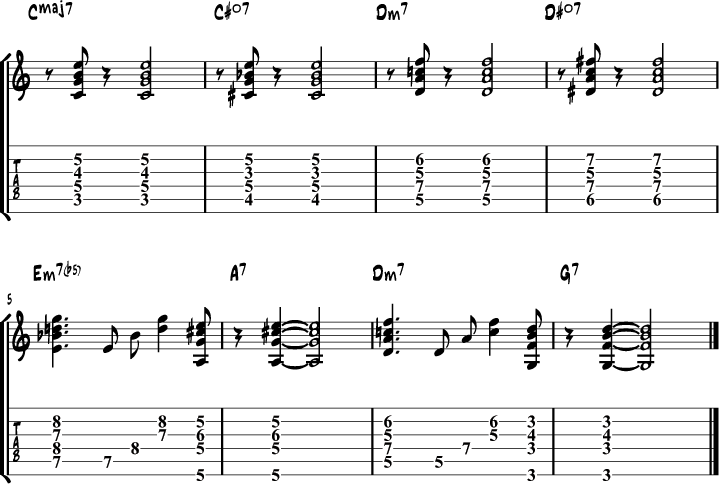
More Easy Jazz Guitar Chords
When you’re ready with the 17 chords from the chord charts above, it’s time to learn some more chord shapes and chord types.
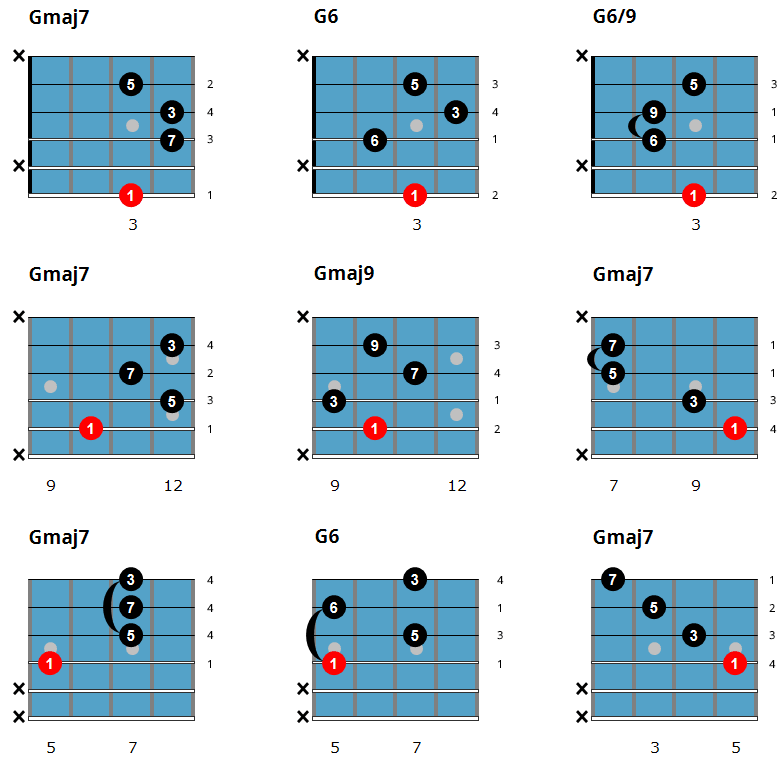
Major 7th Chords
Here is a chord chart with 9 major chord voicings, which include maj7, 6, and 6/9 chords.
These major jazz chords are often used at the Imaj7 chord in a major key ii-V-I progression.
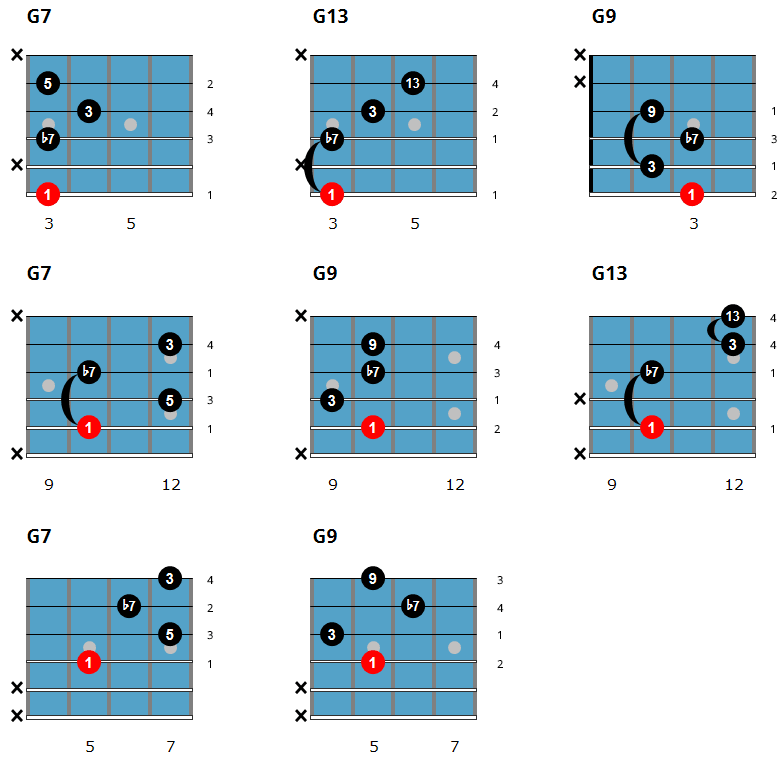
Dominant 7th Chords
You will now move on to working on dominant jazz chords, which will focus on 7, 9, and 13th chord shapes.
Some of these chord shapes you will already know as they are common blues guitar chords.
These chords are used in jazz blues chord progressions, as well as the V7 chord in a major key ii-V or ii-V-I progression.
Minor 7th Chords
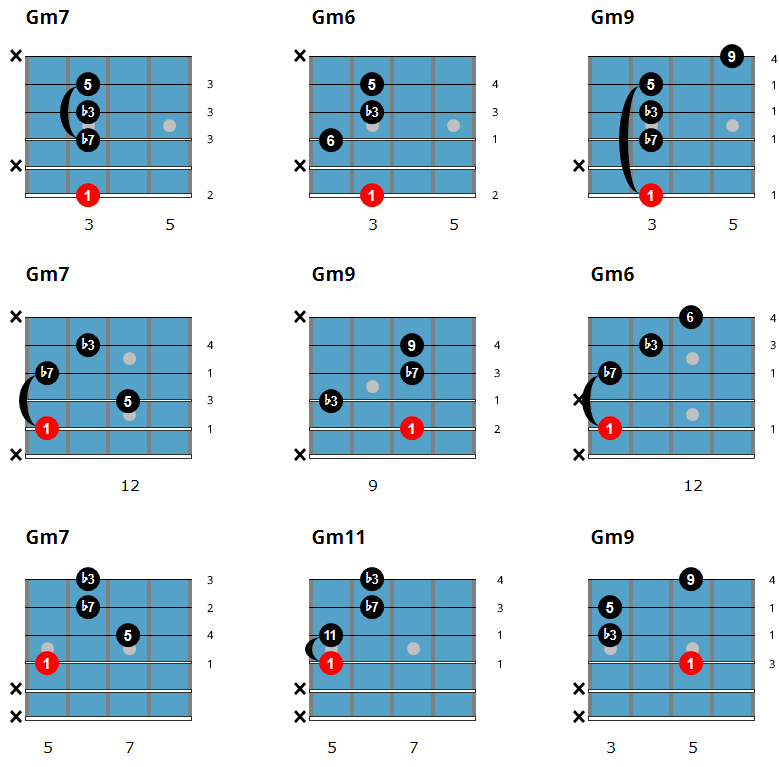
In this section, you will work on minor jazz guitar chords, which include m7, m6, m9, and m11 chord shapes.
Minor jazz chords are often used as the iim7 chord in a major ii-V or ii-V-I progression, as well as the Im7 chord in a minor ii-V-I progression.
Minor 7b5 Chords (aka Half-Diminished Chords)
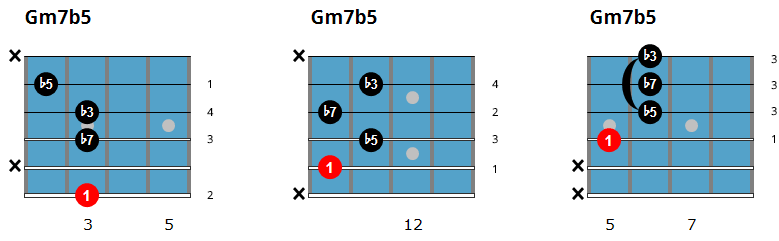
The next group of chords focuses on minor 7b5 chords, also called half-diminished chords and written m7b5.
Because there is only one easy shape per string set for these chords, you will only need to learn 3 m7b5 voicings.
Half diminished chords are used as the iim7b5 chord in a minor key ii-V progression.
Diminished 7th Chords
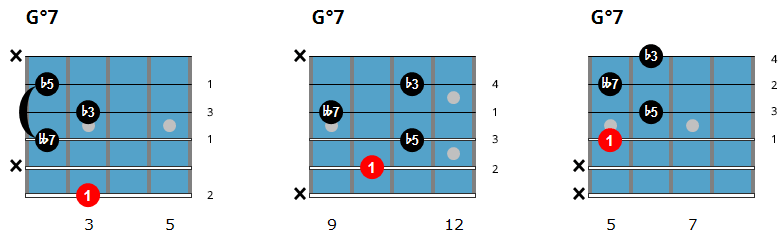
Diminished chords are often used as passing chords, such as in the chord progression Imaj7-#Idim7-iim7.
They can also be used in place of a 7b9 chord, such as playing C#dim7 instead of A7b9.
Altered Chords
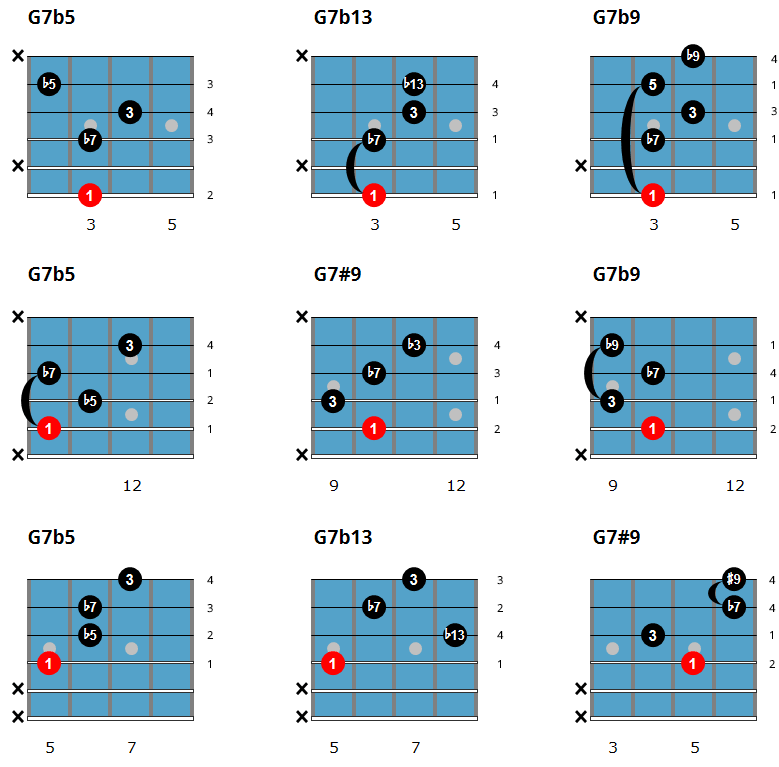
The last set of chords that you’ll explore are altered chords, which you will often see written as 7alt on lead sheets. These chords feature the b9, #9, b5 or b13(#5), or any combination of those notes.
Since we are looking at easy jazz chords in this lesson, you will only use one altered note per chord. Over time you might find yourself drawn to use two altered notes when playing these types of chords, such as 7(b9,b5) for example.
These chords are often found as the V7 chord in a minor key ii-V or ii-V-I chord progression, which you will see in the chord progression examples below.
Major 2-5-1 Comping Patterns
Now that you have checked out these easy jazz chords on their own, it’s time to bring them together and apply them to common jazz progressions.
To begin, here are three ii-V-I-VI chord progressions that use the shapes from this lesson in their makeup. After you have learned these initial examples, make sure to take them to other keys in order to practice them around the entire fretboard.
You can substitute any other chord from the same family into these progressions in order to expand upon them in your studies. For example, if the chord is Cmaj7, you could play a C6 or C6/9 chord in its place as they are all from the same family of chords.
To start off, here is a ii-V-I-VI in C major that begins with the iim7 chord on the 6th string, and moves around the changes from that starting point.
Listen & Play Along
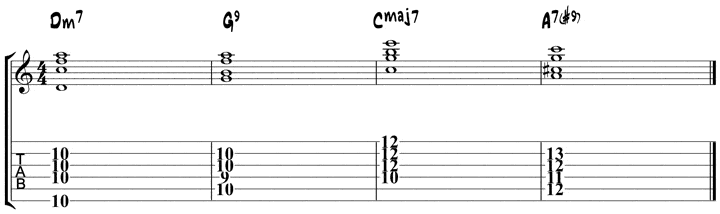
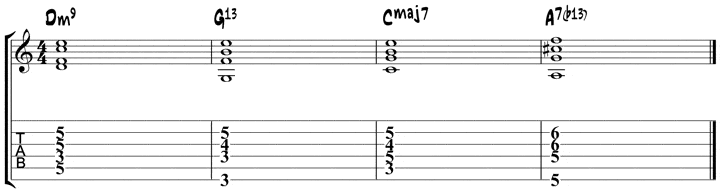
Next, you will work out the same progression, but this time the iim7 chord is on the 5th string and you will move to the other chords from that initial chord.
Listen & Play Along
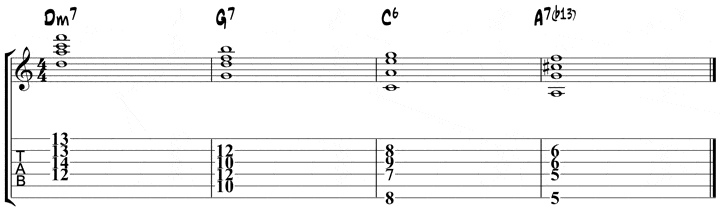
Lastly, here is a progression that moves around the fretboard a bit, which is something you might want to do when comping behind a soloist, beginning with the iim7 chord on the 4th string.
Listen & Play Along
Minor 2-5-1 Comping Patterns
The final exercise in this lesson will feature three minor key chord progressions that use a number of the chords featured in the lesson above.
As was the case with the major key examples, feel free to expand upon these chord progressions by taking them to other keys, as well as substitute other chord shapes from this lesson into these progressions.
To begin, here is a minor ii-V-I-bIII progression that begins with the iim7b5 chord on the 6th string and works around the chords from that starting point.
Listen & Play Along
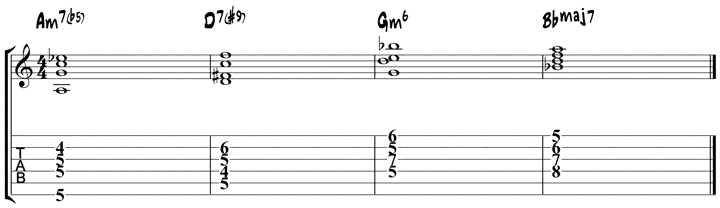
Next, you will begin with the iim7b5 chord on the 5th string and work your way around the progression from there.
Listen & Play Along
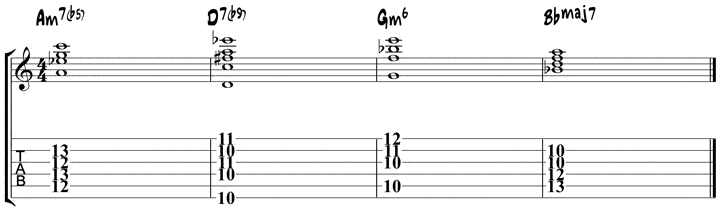
Finally, you will begin with the root note of the iim7b5 chord on the 4th string, with the subsequent changes being closely related to that initial shape.
Listen & Play Along
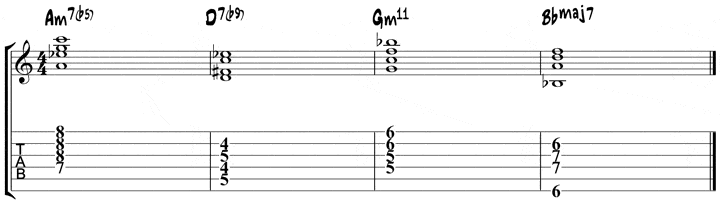
After you have explored these shapes, and if you got stuck or have any observations on this lesson, share your thoughts in the comments section below.
If you want to learn how to play jazz guitar chords step-by-step, check out our best-selling eBook, The Easy Guide to Jazz Guitar Chords.
More Jazz Guitar Chord Lessons

This has been always puzzling to me: In the chord diagrams, why do people depict the thick E string at the bottom? As I am holding my instrument, the thick E is always on the top. I have to perform mental arithmetic to rotate the diagram to match what I see when I look at how I actually finger a chord. Just want to know what is the logic for the way chords are depicted here?
Chord diagrams are depicted with the low E string at the bottom to simulate the view from the guitarist’s perspective looking down at the neck. Depicting the low E string at the top of the diagram, as you mentioned, would simulate looking at the neck in a mirror from the guitarist’s perspective.
Hey Dirk,
I am wondering how you would analyze the diminished chords in chord exercise number 5? Are they considered passing chords? Also, would a jazz player consider the A7 as a V of ii or just a Major II chord? Do you have any courses on understanding jazz theory? I would love to understand jazz theory better. Thanks so much!
-MP
It feels more like a chord substitution, since (for example) the “C#dim7” carries over the C#, D, and G of the “A7” chord, which would normally lead into the Dmin chord that follows.
Thank you for sending me the pdf file
Man, das ist genau das, wonach ich solange gesucht habe.
Perfekt auf meine Bedürfnisse ausgerichtet und äußerst stimmig und nachvollziehbar dargestellt.
Klasse Arbeit !!!
Vielen Dank !
Hi Dirk, Awesome exercises. I am having a lot of fun practicing but my tone on the other hand is not sounding so great. I have a Dangelico Boardwalk DC semi with a Fender Mustang III V2. I have downloaded a few presets for jazz, but they don’t have your same sound. Any suggestions? Thanks again.
Hi Dirk – Absolutely brilliant .
Thanks Regards Gerald
Hi Dirk,
Wow that is amazing content, and well structured too! I love the Kenny Burrell example, playing it makes me feel like I know what I’m doing 🙂
One question though, in Jazz guitar chord exercise 2 you introduce the G#07 chord.
The fingering shows g#-f-b-e. Should it not be g#-f-b-d in order to be a dim7? Now it sounds more like a third inversion of an Eb9.
Thanks for the great content, this will have me working for some time!
Eddy
Thanks Eddy! Yes, that chord is a bit hard to name… One way to see it is as a diminished passing chord between I and II. The e is a color note of the diminished chord. Another way to see it is as an E7b9/G# (the V of the II). Yet another way to see it is as G13/Ab, so a G13b9 chord with the b9 in the bass (bVII). Cheers!
Might it also be G#m6#5? For example I have seen it named that way (and I hear Gilberto play that exact voicing in the Getz/Gilberto recording) where it appears as the second chord in the A sections of Corcovado, between the Am6 and the Gm7. (Although in that context, since the key is C and the chord is used in a chromatic descent, the naming is more often Abm6#5 whereas your exercise is in G and the movement is ascending)
Hi Bill, technically you could call it that way, but it doesn’t make sense in terms of functionality…
Super !!! I like !
Is it possible for you to include suggested fingerings for these chords? for example, Cm7 with D string as root note, i’m assuming you barre the E and B string with your middle finger? and for Cm7b5 you barre the E B and G strings with your middle finger? I’m really having trouble with Cm7 with D string root because my ring finger would lightly touch the B string and mute it. I have small hands by the way
Hi Khoi, I added the fingerings to the chord chart.
Hello Master ,
I am practising according to you book ,How to play perfect Cmaj7 -drop3 chord (page 21) by without playing open string A ,root position of C at 8th fret. When I am playing I am hitting the open string A .
Hi Ramesh, drop 3 chords are usually played fingerstyle: play the bass note with your thumb and the rest of the notes with fingers 1, 2, and 3. If you want to strum these chords, you have to mute the open A string with finger 1 from the fretting hand (the same finger that is fretting the bass note). I hope that clarifies it!
Hi, is there a particular reason why fingerings are not noted for the chord shapes?
I find proper fingerings essential, especially to know what possible anchor fingers to use when switching to a new shape.
Or is the idea that there are basic common fingerings for each shape that one can easily look up on the web?
Hi! I love his, how can I buy more of that? I bought Introduction to Jazz Blues Guitar and it is not that funny and I am stuck after one chapter as there is some crazy solo…
Thanks! Tom
Hey Tom, check out our Introduction to Jazz Guitar Chords:
https://www.jazzguitar.be/store/easy-jazz-guitar-chords.php
Extremely helpful and well done. The slightly harder progression of material makes it easy to build from the fundamentals you teach in example 1.
Thanks For Your Time and Effort,
Corbin Smith
Brilliant lessons. Well set out and straightforward to follow. Thank you for the time and effort you put into providing this information for us.
Kind regards
Rob
Awesome because I just began jazz. I am new for jazzing.
I love this stuff. It really brought home to me, to see how enjoyable this is to listen to and I’m jumping in with both feet. Thanks!
Very helpful,Dirk,much appreciated.Appreciate the large printing,Len.
Hoi Dirk, great stuf to start Jazz guitar.
Thanks Frits!
One thing I don’t understand is why the Chord marked F7 in the second line is tabbed as the m7 shape?
This website is amazing. I will definitely use your exercises and memorize these chords. Thank you for this incredibly helpful chart and example.
Greetings from Germany!
Thanks a lot, this is seriously good and probably the best stuff I found over all internet for beginners. I myself as a blues/rock guitar player for over 15 years couldn’t benefit more to expand my horizons with all this great information from your blog and pdf lessons. Thank you sir, you’re awesome Dirk. Cheers!
What a great lesson, such an excellent way to learn chords and progressions. Exactly what I am looking for. Spent most of the evening going through the progressions. Your lessons are super, keep em comming 🙂
saludos cordiales,por favor no se ingles tiene alguna herramienta para tradusir al español,gracias aprecio su atencion.
Buenos días
Tampoco sé mucho inglés; pero estoy traduciendo con el Traductor de Google.
Saludo cordial
Muchísimas gracias al autor, creador y profesor de esta maravillosa página.
¡Bendiciones!
Do the books come with CDs for each of the exercises given in the books?
Are these lessons you post included in the Jazz courses you are selling?
Hey, no there are similar lessons but all of our eBooks are unique content only available in those books. cheers.
Please post more of this to my email. Its really helpful
Hey Dirk I’m a 70 yr old white head and learning to jazz it up. I really appreaciate the tips and tricks THANKS BIG TIME.
I’m just starting out and have found this lesson to be a great tool to get me learning some chords without having to sit and just memorize chord charts! Would you more experienced guys out there recomend using a pick or finger picking when starting out with jazz guitar. I feel like the above exercises are easier with fingers, but I feel like most jazz guitarists use a pick. What are your thoughts? I have a background in guitar, just new to jazz.
Many jazz guitarist use finger style. Suggest a listen to the late Charlie Byrd as a premier example.
Hi Dirk,
This makes me want to come back for more! Entertaining good stuff.
Steve
Only managed to have a very quick look at these last night but looking forward to trying these .. I did try a couple but in latin time .. gorgeous!! More super stuff to learn and add to my guitar vocabulary!! Many thanks.
Great Stuff!
Great lesson on comping too.I’ve played these chords for years and you still came up with a voicing I haven’t used.Bravo!
Great lesson once again – the backing tracks are also good for practising solo’s too
Wearing my accessibility ‘hat’ I am always on the look-out for praiseworthy sites that present clear, easy to read and unambiguous content. This particular chord chart is so well presented (even to the extent of making the orientation of the chord windows obvious by representing the thickness of the strings) that I would like to offer you a ‘pat on the back’ for the thought that went into assembling the page not only for clear-sighted but also for visually impaired prospective users. The fact that the lesson is probably the bet introduction to jazz chording I have found on the Internet is a welcome bonus!
You guys are wonderful. the formats that you present are all so easy to understand and laid out in such a logical manner. I look forward to every Email i recieve from you. It is a joy! Keep up the excellent work. All the best to you from Vernon British Columbia Canada
your input to the jazz guitar world Dirk is highly appreciatable, but for us in the part of the world with no easy access on the internet, does not offer much help.
Proprio quello di cui avevo bisogno…
Great stuff lad’s, beating through timber in the wood shed.
hi can you explain or at least point me in the direction,of how you know on which beat to come in on,on singing/playing a tune.
if you dont have the sheet music? never understood how you know this and never seen any explaination.
feel a right dummy having to ask.!
Hi James. Good question. It depends on the tune. If there’s a drum intro, or other intro, that can help you count along until the top of the tune starts. If there’s no real intro, then you can start right when the music begins. Not sure if that helps, but it’s the way I would think about it.
Thanks Dirk
This is a lesson I really needed to start playing jazz.
By the way, I come from the Dallas area & we have another Dirk here (Mavericks).
Muito, muito bom! Parabéns! Very, Very Good!!!
Hello,
You guys are the best, All your courses are very useful to me. Very nice work.
G.D.
Excellent tutorial!Thank you.
I can only thank you guys for sharing your knowledge on this challenging discipline of jazz music/guitar in the way that you do. No where have I seen such clarity and structure presented, not to mention the bag full of tips and tricks to make things easier where possible- the essence of any worthwhile instructional site. “FAN”-tastic and well done from a grateful enthusiast at the tip of Africa!
Thank you for the Chords, I´ve Been reading many articles and books about music theory, but wasn´t able to get chords. Now, with this excelente chords that you uploaded I have more information for practicing what I have learned. Thank you very much Dirk!
Thank you very much. A great lesson. As indeed other. The best site of its kind online certainly.
Great ,just what I needed.
Can’t thank you enough for the treasure of putting these together. Blows my mind how good they are and the generosity. Thanks Dirk and all who add!
Thank you for the lessons, they are so helpful. Chords and understanding how to form them are one of the fundamentals of playing Jazz guitar.
Great lesson…of course, all I KNOW are “easy” jazz chords. LOL!
Well arranged and good fun. Cheers
Hey great lesson and it was exactly what I needed right now! But I noticed the G6/9 major chord does not contain the 3rd (B) but it does contain the 5th (D). I thought the 3rd was more important than the fifth because it provides the major quality. Is this something we should try to avoid if we can (i.e. by stretching the finger down to barre on the 3rd, 6th & 9th or moving the 5th down 3 frets)? Which voicing would be better for a jazz situation?
Thanks. That’s just a common voicing for that chord on guitar, though it doesn’t have the 3rd. The voicing that’s there is the most common for that shape, but you can add the 3rd in on the 5th string if you like. The problem with that is it tends to sound too muddy when you bring the 3rd in, too many low strings vs. high strings, and it can muddy the sound of the chord. So skipping the 5th string, and the 3rd in this case, solves that problem and still keeps the sense of the chord. Hope that helps.
Cool that definitely makes sense. Thanks for the quick reply!
Great lesson, in spite of considering myself an intermediate player with decent rhythm and comping chops this lesson is a welcome refresher. It is too easy to slip into lazy or convenient fingerlings and lose track of the (available) alternatives.
Thanks as usual , great material! Dkw
Thank you very much. You are awsome. Everything is very usefull in your website. Cheers.
Thanks very much for the lessons , please add a lesson on quartal harmony on the style of Ed Bickert.
hugs
great lesson! Thanks so much for putting this together Dirk!
The lessons are very helpful and deeply appreciated. So far, I’ve understood everything, but these old hands are struggling to make some of the chords.
Thanks again.
Thanks for sharing, you are the best website jazz. I’m learning to play this style of music and for many years, I had not found significant theoretical resources for learning.
Thanks for include chord progressions to teach it, is a great learning tool.
A million hugs my friends.
Thanks for a good lesson!
Since we are talking about beginner stuff, I would’ve liked to see instructions or tips on actually fingering these chords. As it would be a good idea for a guitarist to learn the chord fingerings usings mostly 4 different fingers to sounds the chords, some of them can be quite tricky for the uninitiated. Of course barre chords are the easy way out here, but we don’t want that, do we? 🙂
Take for an example, a 1573-shaped dominant 7-chord with the root on 5th string: there is a considerable stretch needed for the 3rd and 4th fingers. The lower on the fretboard you voice the chord, the bigger the stretch, right?
If possible, it would be great to have a lesson or tips on practicing the chords and the more demanding chord voicings, i.e. to bring the stretch abilities of the player to a whole new level 🙂
Cheers!
kinda hard to hold and play a guitar with a computer in front. If these were extracted from a book I could buy and put on a music stand it would be more practical. Because of this I dont understand how all the guys above find this so great.
Thank You Dirk!! I’ve been noodling around on guitar for years. Finally learning the proper way to practice and *unlearn* some bad habits. Great stuff.
great, thanks a lot. Great method, no confusing. Could you put chord inversions as well?
Hey Jerry, drop 2 chords and inversions you will find here:
https://www.jazzguitar.be/blog/drop-2-chords/
Thank you so much ,,,, it helps me as a blues player to gett in the jazz , it is not easy but i have so much fun to play 2-5-1 progressions and learn new cords on that way.
i have a long way to go ,but every day i learn something new .
thank you mister Dirk.
Huub Luik
Great, I really appreciate your work because It’s really easy to understand, thanks.
Thanks again for these lessons.
Some positions are easier than others (big fingers, small cases…).
Un grand merci !
When in doubt or in search for inspiration , I always return to this site.
You manage to clarify things in a structured and understandale way, there where most other sites fail.
Thank you for the work; I’m having my regular portion of fun with it and it makes me hope I can one day achieve a reasonable jazz guitar level.
pls send m the jazz tutorials so, I can download it. thks for your assistance.
Your site is really great! Thank you!!
This is such a treat — Great little lessons that have applicable backing tracks
Thanks so much !!!
Great site and great lesson.
I have a question: where the root in on the 5th string, the alternate fingers for the 7-chord and m7-chord both drop the 5. Isn’t the 5 critical to defining the chord? What are the tradeoffs in the decision to use one shape or the other (keep/drop the 5)?
Hey Michael, the 5 is the least important chord note and is not critical to define the chord. 3 and 7 are the more important ones.
Thanks for the explanation. It’s a great lesson that I’ve been working on and enjoying for a few days. I’m still struggling trying to figure out the most efficient fingerings for the exercises.
I can only imagine how much work goes into assembling this lesson, which I and others greatly appreciate. Would you consider supplementing it with a YouTube video to help on the most efficient fingers for the exercises?
This is just great… amazing website, thank you!!!
…best guitar free teaching site on the internet.
FRom Malaysia, thanking you so much for this illustration.
The knownledge of chord construction is well explained. Thanks.
Nergens een jammsessie & masterclass ergens in de vlaanders?
Fijn werk, thx!
Thanks a lot Dirk. You´re the teacher!
Can someone tell me how to know which fret he’s on when looking at the chord charts?
There’s a number in the lower left on each chord chart which represents the fret number. If it isn’t clear look for where the C notes are.
Hi
What I do is look for where the R is. That will tell you where to play the chord. For example if the R is on the fifth string on the third fret it is some form of a C chord. As you become more familiar with the notes up and down the neck diagrams like this are very helpful because you begin to get a feeling for where the various chord tones are placed in reference to one another. When you come upon a chord you don’t already know you can use your fingerboard knowledge to figure out the new chord. For example if you know where the various chord tones are located in a particular fingering you can just lower the 7th 2 frets (one whole step) to get a major 6 chord
Very helpful and keep them coming. Your basic book is fantastic and recommend this to everyone and the price is so cheap. I’m waiting for the next one, but must admit there is hardly enough time to fully practice Introduction to Jazz Blues Guitar.
Hi
I love those basic chords, really useful.
and the practice part is more helpful for me.
thank a lot..
A big help for me the beginner. Great presentation and advice. The suggestion of a back ground loop may be helpful.
Since I’m just starting to play jazz guitar, this is going to be a great help!
Gracias, es de verdad excelente, y me ayuda mucho en mi aprendizaje, Saludos desde Mexico.
Hi Dirk, much appreciate what you’re sharing with us, but why make it impossible to print and/ or download?
Muchas muchas gracias!!! Excelente tutorial para comenzar a aprender algo de este hermoso género musical. Saludos desde Argentina!
Now the translation: Thank you very much! Great tutorial, helps a lot to introduce ourselves into this beautiful world people call jazz. Greetings from Argentina!
This is awesome! Thanks Dirk
thanks a million. i listen to light jazz often and always wished i could get a sound like those guys. but i see that it takes a lot of practice to get the fingers moving the way my brain is telling them to. like you have mentioned, “stuck in the same old rut”….yes…for years…my fingers and brain are starting to come around and heading in a new direction and loving it
what a nice way to begin to play jazz , the beginner chords helps to build up the your chord , tones , voicing and also helps your fingers to be flexible , how can you help me to build up to the intermediate level in jazz , please can you send me a lesson on how you can improvise on the beginners jazz chord lesson. keep the good work am really learning from your lessons.
Great lesson as always ! Cheers !
This lesson could not have come at a better time. I’m trying to visualize the 3’s and the 7’s in these standard chords as I play through standards. This lessons organizes all my scraps of paper into one location. I wish I had seen this stuff 30 years ago.THANK YOU.
Inspired to woodshed after seeing Zappa Plays Zappa the other night. WOW,
thanks for your time to let us know these chords, but i don’t undastand staff notations……..so i cant read the chord diagram, i will prefer it if you write on the strings. Thnanks
Thanks.. I’ve saved the page to practice it when I shall, but it would have been very kind if you would have provided the backing tracks for download, cuz here in India, internet is not so cheap.. Will be waiting anxoiusly for the next lesson.. Also i would like to ask, why is bebop so complicated, harmonically.. And how do we use quartal harmony.. And by the way could you give some famous examples of 2 5 1, and 1 6 2 5 progressions.. I am a little bit familiar with Miles Davis, John McLaughlin, Coltrane sort of thing,, any examples from there..?
this is amazing….God bless you Dirk 🙂
Hi Dirk
I also would like to be able to do this exercise offline – don’t see any responses to the download questions. Is it possible?
Thanks
The chart of the chord forms is a png file which can be saved to your computer.
This is really helpful.. I learnt quite good progressions from you. Million thanks for sharing this valueble knowledge with us. Warm wishes from Sri Lanka.
Wonderful! That’s what I was looking for! A PDF link would be really highly appreciated
Nice work. Appreciate your effort with putting your lessons together. It would have been nice to have link to a printable pdf of the chord shapes.
Thanks
Thank you for your lessons. I am very new here, first steps in jazz, and I have not used tabs before. I am not familiar with the graphical presentation of chords above. I guess vertical lines are strings, and horizontal are frets? Black dots are fingers? What are the small gray dots? Also not sure of positions, because fret numbers are not marked? I have used to barré type chords when playing dance music here. That is why I am very confused. Could someone explain?
Oldjazzman
Hi Ollie, horizontal lines are strings, vertical lines are frets. Black dots are fingers, grey dots are the same dots as on your fretboard. Frets are marked by a number below the diagram, no number indicates first position.
Excellent, but i think you could add the software where i could print the lessons.
Thanks.
Excellent introductory studies to set the mindset for jazz. Should be helpful for all.
So much to learn and so slow at it but really appreciate your course and love the insights I have from learnng to play when listening to it.
bet no one can come up with credible chords to to ” who do you think you are kidding mr hitler” All time BBC hit comedy
You may laugh but that is a very challengin construction,
otherwise always looking for credibel jazz prgresions for popular tunes…all of me eg
phil
Thanks Dirk. it’s a great lesson, to enjoy
cool stuff you got..
By far, this is the most simplest yet interesting Jazz tutorial I have ever tried. Excellent work and thanks heaps, Dirk.
Ed from Sydney Australia.
Thanx Dirk,your lessons are always very helpful
i really enjoy d lesson, they are the chords i need now!! thanks
As always….good stuff..very good..
A great site…to be sure…
Time on the instrument…
I’m a beginner, and you delivered exactly what I need right now. Thank you!!!
As for feedback, I’ve thought about the comment of providing fingering instead of root and intervals. As a beginner, I would find both very helpful. The intervals teach me the role of each note in the chord, and the fingering shows me how to play it.
The finger numbers could be placed to the right of each chart next to the strings that are being pressed, including the muted ones.
thank you so very much Dirk for some really great lessons
i am a senior citizen still thinking like a hippie
playing guitar for most of my life in bands
now just for myself and i still love the challenge of learning
something different every day
again thank you for making my time quality time
mike
Great! Just what I needed. Thanks
Hi Dirk, it’s a great lesson. Fine explanation – also for beginners.
Greetings from Austria 🙂
A great lesson Dirk. Thanks so much!
This is the best chord chart for beginning jazz guitarist.
Thank you for this lesson!
I actually knew those chord shapes but couldn’t figure out a musical way to practice them!
Thanks to you guys I won’t be lost and waisting my time anymore!
The great lesson: every day, before pick up the guitar, i’m a beginner, from 36 years. Thanks to remember Dirk!
Dirk and Matt–Like Dr. Mudaliar and Mr. Chasba, I took up guitar when I retired (college professor) some years ago. Your methodology is THE BEST–especially your very jazzy, engaging way of playing the chords on the backing tracks! It’s as if it’s not a lesson so much as a cheerful jam session we’re invited to attend that just happens to be the essential chords needed for jazz. Because it sounds like part of a jazz tune, it adds to the enjoyment of playing and learning these chords. Bravo and kudos to you both, and thanks again!
just the sort of help I need., am new at this jazz stuff, but i really like it and want to be able to play it. thanks
Good, clear explanation of the chord root and relevant tones.
Good , clear explanation of the chord structures.
bom de mais gostei mto
I haven’t been studying, practicing or playing ‘jazz’ guitar for a few years now. Got the email link this morning, read through the page and started practicing the useful cycle exercises. For a free ‘taster’ lesson it is very generous and practical and I think you can get a lot of mileage alone out of whats on the page as an access point to practicing most jazz and I have read through other educational texts. Its not boring or rigorous, easy-on-the-eyes, easy-to-understand, succinct and to the point. Good Job Dirk, and thanks for your generosity.
Hi man, thanks for you lesson. It is cool
Dirk, I appreciate your effort to help me understand what’s going on with that thing called “guitar.” Maybe one day I’ll catch on!
Hi Dick,
Excellent lesson. Is there any way to download the tracks from the sound cloud? I would love to be able to take the backing tracks with me, especially since my practice room doesn’t have a internet connection (I planned it that way so there are fewer distractions).
Thanks
Dirk, Many years ago I bought the Micky Baker Jazz Method. It took awhile for me to learn the basic Jazz chord changes. I see that you have presented these chords in a straight forward manner. Thanks for demystifying this important part of learning Jazz.
Joseph Tuccillo
Excellent and deep explanation of the way the chords change, amazing site and amazing work!!
Hi Dirk.
Your lessons make me love jazz more than I did!
Kindest regards from Colombia
Excellent guide to help players from other genres open up their ears to experimenting with jazz
Hi Dirk,
Thanks for the teachings. How can I get this particular write up in PDF format?
Hi Dirk,
Very nice lessons to begin with.
Is it possible to download the backtracks.
Just seen this. Haven’t had time to try out yet but it looks very, very useful. Many thanks in advance.
Very nice lesson and definitely useful – thanks!
another one great, simple and well graft lesson from you Dirk
Well done, valuable, clear, user-friendly. Thank you, Dirk!
Dirk it is so nice to receive lessons from you . They are so informative and helpful . Thanks man ! Rob!
Excellent material. Thanks for sharing.
Nice! Keep up with this stuff!
Hi Dirk,
I would like to download the chart and backing tracks so I can practice later without having to come back to your website. Is this possible? If so, am I missing the download link?
Thanks,
Sergio Giocondi
Nice Work!
Thanks
It is absolutely great and generous what you send us, Dirk!
I am a visual artist, so I am not always able to follow the lessons in time, but it is just so convinving and seducing all the stuff you send! I am sure I will go through all of it as soon as possible. I have already studied a bit your chord construction lesson with good results 🙂
Many many thanks!
Great lesson! NOt only for beginners!
Great, Dirk
A great insight into jazz chords for beginners, which IMHO is as equally important as single lines.
I had the privilege of being taught by a professional musician who put great emphasis on chord
melody playing, which is very effective when playing in trio”s etc.and very satisfying to listen to.
A very high proportion of the great players are /were very adept at chordal playing in addition to
phenomenal single lines/ octaves.
yet more pearls of wisdom from Dirk ! ( a masterly player )
Awesome Dirk, really nicely put together, thank you for this!
Hi, well done, I always thought that to learn chords with the “chord tones” and not finger position is the best way, It is so important to know what note your finger is pressing.
Dirk great idea for that kind of lesson. If it is meant for beginners its maybe more easy for them if you insert the fingering instead of the interval relationship into the chart. Just a hint from a colleague.
Keep on the good work very nice lessons I point my students to watch your project here.
interesting, opposite idea of mine ( i think note intervals very useful and should always be there), even for beginner i think learning the intervals is easy, it is better, and even if it might seems hard at beginning it opens the “world of understanding” 🙂
Actually, I don’t see it as an either or… it’s helpful to understand how chords are related, and it’s helpful to know how they are fingered.
Thanks Dirk. A very valuable lesson even for non guitar beginners… I finally clearly understood how these chords are built. Once again it is shown that a picture is worth a thousand words…
Roland
Very good Dirk. Your teaching makes me a better player!!
This is great! I don’t know many shapes so this will help a lot. Thank you!
Hi Dirk, good stuff!Thanks
Can I print the lesson somehow??
After years of playing pop,rock,funk. I am now moving to jazz . Thank you so much . This is of real help . appreciate the good work . Keep it coming .
Awesome foundation study.
No guitarist can ever know too many II V I progressions.
I will pass this on!!!
Dank je wel, Dirk.
Thanks Dirk. You’ ve no idea how useful lessons like this are to us beginners. You read this and suddenly the penny drops and you take another step forward. You and Matt are great teachers!
Thank you loads! Those are very helpfull.
Very good stuff i like
AWESOME! Just what I needed. Baie dankie, Dirk!!
nice and easy using the three bass strings
I’m a newbie and this is GREAT! Thanks a lot!
Cool man’ Like dig it Daddy-O.
Great lesson Dirk. Really helpful to learn and/or teach the basics.
Great!!! Thanks a lot.
I downloaded your guitar chord chart for beginners. I don’t play guitar; I have always found it to be a difficult instrument with respect to the fingering. I respect it and enjoy listening to all kinds of guitar music: Flamenco, Bluegrass, Jazz, and Classical guitar. I truly liked your lesson on chord progressions. This I found to be a very useful lesson on chord progressions and chords.
Ralph Sirvent, Jr.
I have been playing guitar for 40 years and have just now wanted to learn some jazz. thanks for the chord chart.
can’t ever go wrong reviewing the basics!
Best Email I have received all day! Dirk is awesome! Tune in to Jazz Quest Radio on KX 93.5 Laguna Beach! Plenty of Podcasts!!!
Dirk, this is really valuable stuff and helps to explain how to play good-sounding jazz. Please keep it up.
This is a nice beginner lesson: easy-to-read diagrams and notation, backing tracks, succinct text. It’s attractive enough for me to read and play through it a little even though it’s for beginners
This is just great.
I appreciate it that you make the time to do this.
Thanks so much!….
Glenn
Great stuff, Dirk !
Please keep ’em coming.
Do keep us, senior beginners, in mind.
I’m a 65-year old retired physician,
in Kerala, India,and have recently taken up
the guitar as a retirement project.
Thanks
Same situation for me . Recently retired, jazz guitar music a passion, have always wanted to play a bit, need to make some modest progress before it’s too late. Learning jazz guitar is not only a great mental exercise but also increasingly a physical challenge as you get older. Any help we can get from teachers like Dirk and Matt that recognise the limitations of the older learner is much appreciated.
i have played guitar for many years as a singer, last few yrs into jazz guitar. retired for 7yrs, found getting into a band of great benefit! you will soon find the things that are hard that you wont find playing alone. currently in four bands (all different) this type of info will set you right, and for me, invaluable.
good luck and enjoy!
Fantastic! Thanks Dirk!
As always, a lesson filled with hours of fun on my guitar! Thanks Dirk!
Thanks Dirk. As usual all the information you supply is of a high standard and helpful keep up the good work.
The X on the chord means do no play that string. What is the bst way to do that?
Hi Nancy
Try using your fingers or pick and fingers to pluck the strings, rather than strum on those chords. Might be helpful.
Though, you should find it easy to mute the unwanted string by touching it with the finger that’s on the lowest note. Same way as Wes (and all other Jazz guitarists since) mute the unwanted middle string when playing octaves.
I find it the easiest to play the 6th string with my thumb. I know strictly speaking this is bad technique, but it frees up a finger to mute the 5th string (very useful for Latin).
Happy strumming!
Very inspiring and motivating for the beginning jazz guitarist. A real treat.
Beautifully illustrated.
Great! Just what I needed. Thanks
Good stuff
This is indeed very useful! I consider myself as a beginner and I’m slowly getting better. These Chords and tracks will help a lot! Thank you very much for your support.
Rainer
Awesome tutorialm awesome site, awesome course and teacher ! Thanks for such great work !
Best from France
Great tabs with great chords and other great stuff. Ty.
Good Intro to jazz Dirk well done.
I want to have a Jazz Chord Grill Example whith sound…
Hi Dirk,
I would like to download the chart and backing tracks so I can practice later without having to come back to your website. Is this possible? If so, am I missing the download link?
Thanks,
RS
While you could download the charts, each visit to this website helps Dirk keep the website going, so your repeat visits are especially valuable.